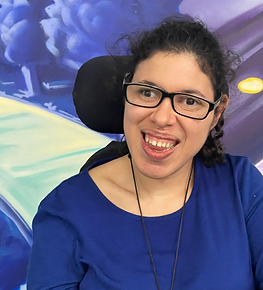
- United Spinal Association member Cristina Cortez shares her outdoor journey from iBOT skeptic to iBOT fan.
- The iBOT PMD by Mobius Mobility was invented by Dean Kamen and unveiled in 1990.
- In 2018, the iBOT was reclassified as Class II, meaning that the power base of the chair can now be used as a starting point to customize the wheelchair to the user with different cushions, seating systems and accessories, and controls.
- Now, the iBOT is more user-friendly, comfortable, and versatile enough to be used indoors and out throughout the day.
I’ve wanted to try out the iBOT since reading about it in United Spinal’s membership publication New Mobility. I was especially interested in trying out the multimodal capabilities of the 6-wheel power wheelchair. How could one chair do all that?
 In 2020 and 2021, I listened to Mobius Mobility’s presentation at the virtual Abilities Expo on its iBOT PMD. I was impressed by its multimodal functions, and I asked whether power seat functions like tilt, recline and anterior tilt were available. The answer was no.
The need for more power seat functions dampened my interest. Also, I noted that if the user needs power positioning in general or a ventilator, the iBOT isn’t the best option. However, I still wanted to try it if I could.
I asked if I could have a trial near my home in Massachusetts, but the ideal place to test it out would be at Mobius Mobility’s headquarters in New Hampshire. Since the chair didn’t have power seat functions for pressure relief, I didn’t make the trip. I chose to wait and see how the iBOT improved.
At the end of 2022, I received an email that the iBOT team was considering a possible outreach tour in the New England area. Would I like to try out the chair? I answered YES!
I wanted to see how usable it would be outdoors, so we agreed to do the test drive at Hale Education, a nature reserve. On test drive day, I was fitted with the six-battery pack version of the iBOT with swing-away footrests.
Customizability and Battery Life
The variability of the customization in the seating system can be seen with the three options in footplates to choose from. The user can choose either a center-mount footrest with a single footplate, a center-mount footrest with individual footplates, or swing-away footrests. Users can also add hip guides, laterals, and a removable headrest. This customization makes the chair adaptable to virtually any seating system and associated positioning components from brands that users are familiar with.
The six-battery pack allows for more extended periods of use without a significant drop in power. I tested the chair in all modes, and the battery’s indicator hardly changed. It only dropped down one energy bar while I was in the chair.
The iBot Seating System and Modes
Before getting in the chair, I switched out the cushion for my own. My Comfort Company M2 fit seamlessly with the iBOT PMD’s seating configuration. I observed that the chair had the Ultra Low Maxx Rehab seating system from Motion Concepts integrated into it.
After getting myself positioned in the chair, I was given an overview.
The iBOT modes are:
- Standard: rear drive with front casters.
- 4-Wheel: dynamically stabilized four-wheel-drive. The seat moves backward and forward to keep the user stable while the drive wheels articulate for ascending/descending grades, curbs, and varied terrain.
- Balance: allows interacting and moving at eye level on two wheels.
- Stair: enables the chair to climb up and down stairs.
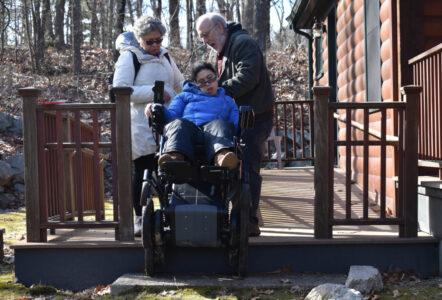
Although Cristina couldn’t find a staircase to test-drive the iBOT on, she did get to descend from a porch.
There weren’t enough stairs on location to fully demonstrate Stair mode. But we tested how an assistant would hold onto the attendant handle with just enough force to guide the stair-climbing function.
As with all chair functions, the stair-climbing function is activated with the forward command. Then the person assisting the climb pulls on the handlebar to start the ascent or descent. The user has the option to enable or disable Stair mode.
Bonus Modes
The chair also features these two additional modes and features:
- While occupied, the iBOt can be tied down or docked with an EZ Lock. Also, its Remote mode allows the unoccupied chair to fold easily. The iBOT weighs 176 pounds without its seating system.
- The iBOT’s 0 Speed setting inactivates the user controller. This is easier and quicker than turning the chair’s power off and keeps the chair from moving unintentionally. This mode is great for transferring since it prevents the chair from turning on accidentally.
Access the mode through the joystick via the main menu and toggle down to the speed section. Switching the setting to Speed 0 inactivates the joystick and seat control toggle switches. To reactivate the control, scroll down to the Speed settings and enter Speed 1 or 2 to resume driving. Also, a quick press of the power button switches the setting to 0 Speed. To reactivate the controls, press and release the power button again.
Hidden Features of the iBOT PMD
The iBOT PMD’s hidden features of adjustable seat height and comfort tilt are activated intuitively. In Standard mode, the chair tilts back 14 degrees to a total tilt of 21 degrees and has a dump angle of 7 degrees.
Full power tilt is not yet available. The iBOT is not the ideal wheelchair for those who need the usual 50 degrees of tilt or other positioning functions throughout the day.
Another hidden function of the chair allows the seat height to be changed. In 4-Wheel mode, the seat adjusts from 25.4 to 30.4 inches. In Balance mode, it adjusts from 30.5 up to 35.8 inches.
It also has what can be called Auto Transition. This feature automatically activates if the chair is in Balance mode and someone or something abruptly pushes it. The chair drops down to 4-Wheel mode while keeping the user upright and stable in the seat.
If the iBOT gets a flat tire, the rear tires can rotate to the front. In Balance mode, activate the tilt function to straighten the seat all the way forward until it stops moving. Then release and re-apply the forward tilt command. The chair will drop down to 4-Wheel mode, and the rear set of tires are now at the front. Alternatively, if the flat tire is in the forward position, the user can switch to Standard, where the front set of tires is lifted off the ground, and the casters are in contact with the ground. Once the flat tire is rotated to the front, the user can drive in Standard until the tire is repaired.
The Joystick: The iBOT PMD’s Powerhouse
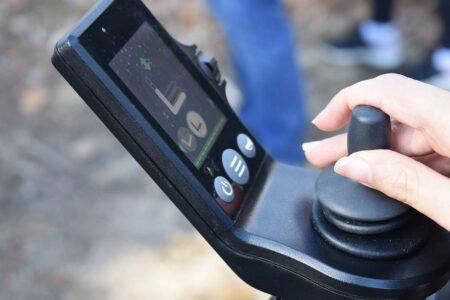
Mobius Mobility makes the joystick console, and the swing-away, easy-click magnetic arm is from Motion Concepts. This easy-click function shouldn’t be underrated because it is easy for someone with low muscle tone to independently use.
While simple, the joystick is the iBOT PMD powerhouse. It has three buttons. Power turns the chair on and off and toggles between the speeds. The horn button’s volume is pitched well, neither too high or low a tone, and usable in an actual situation. The Menu button allows users to change between modes, speeds, and all the chair’s functionality.
The joystick has an ingenious safety feature. If the user’s hand is still on the joystick while pressing the Menu button, the chair will not switch modes until the hand is off the joystick. This took a little bit of getting used to.
Calibration and Standard Mode
Before my test ride, the iBOT PMD was calibrated to my center of gravity. In calibration mode, the chair runs through six different positions to adjust its responses to the movement of the user’s body and weight. This only took a few minutes.
I did a few laps in Standard at the lowest speed setting and toggled up to the maximum. I could feel the difference in the thrust of forward movement that comes with a rear-wheel-drive chair, which I hadn’t felt since 2000 when I got my first chair.
Even though the iBOT is RWD, it feels more like FWD, making it a potent and comfortable drive configuration. But, the tight turning radius when executing a full circle makes it feel like an MWD chair. This distinctive feel of the drive comes from the wheels being air and not the standard rubber tires. These wheels add bounce and flexibility to the chair, allowing it to perform well across all its modes.
Getting more comfortable, I switched to Speed 2 and turned it up to full speed. The chair topped at an impressive rate of 6.9 mph. Most of my chairs only went up to 6 mph.
4-Wheel Mode
In 4-Wheel mode, the chair automatically tilted me back, increasing my field of vision and its traction. I easily drove through a rocky path and leaves down a hill. Due to my spasticity, I found it more comfortable to glide down the hill through the leaves.
The iBOT PMD team and I went down Hale Education’s Storrow Pond Trail. Still in 4-Wheel, I ripped through wet dirt, gravel, tree roots, and loose rocks without losing stability. I appreciated how the chair could open new paths and carve out new trails, which most power wheelchairs can’t do.
Balance Mode
The iBOT PMD’s Balance mode is unparalleled. It changes its configuration from Standard or 4-Wheel to balancing upright on two wheels, as the second pair of drive wheels stacks itself on top of the rear wheels.
Balance Mode in the iBOT is the closest thing I have experienced to standing upright on my own feet. Once Balance is activated, the chair gently leans forward to initiate “drive” and then keeps on moving at a nice pace of 3.2 mph. If the user stops driving in Balance, the chair gently rolls to a stop. When “standing” in Balance, the chair glides in tune with the user’s body.
Putting all Drive Modes to Use

I confidently switched from mode to mode at will as we meandered down the trail to Storrow Pond Beach. Once there, I asked about the story behind the iBOT PMD.
Dean Kamen got inspired to design the iBOT after witnessing a wheelchair user struggle to navigate a curb. He decided to develop a device that intuitively responded to the user’s body. As a result, the iBOT, in its past and present iterations, can best be described as “a second skin,” allowing users to experience the world on their own terms regardless of the turf and trails they may encounter.
The iBOT meets the user’s demands regardless of the terrain and obstacles in many indoor and outdoor environments. The modes are not just cool extras. They are integral to the chair’s capabilities, and these inbuilt functions can open up the world to new terrains, activities, and adventures.
Before returning the chair, I wanted to test the iBOT even more. I switched from Balance to 4-Wheel and tackled grass, rocks, and sand seamlessly at the beach.
The iBOT outdoor test drive gave me an intuitive and innovative multimodal experience that I still can’t shake. I will be considering it as an option when looking for a new wheelchair in the future.